Dashboard & Workspace
One landing screen for the whole business
The landing screen every user sees after sign-in. It surfaces live receivables and payables, a total-sales trend chart, most-used reports and quick shortcuts, then lets the user narrow the entire ERP to a single division or cost centre.
- Dashboard
Live KPI tiles for total receivable and payable, a total-sale trend chart, most-used reports and one-click shortcuts into common tasks.
- Scope Selector (Division & Cost Centre)
Switch the entire workspace into a single division or cost centre so every subsequent screen, report and total is filtered to that scope.
- Parties
The single master list of customers and suppliers with balances, contact details, tax registration and transaction history.
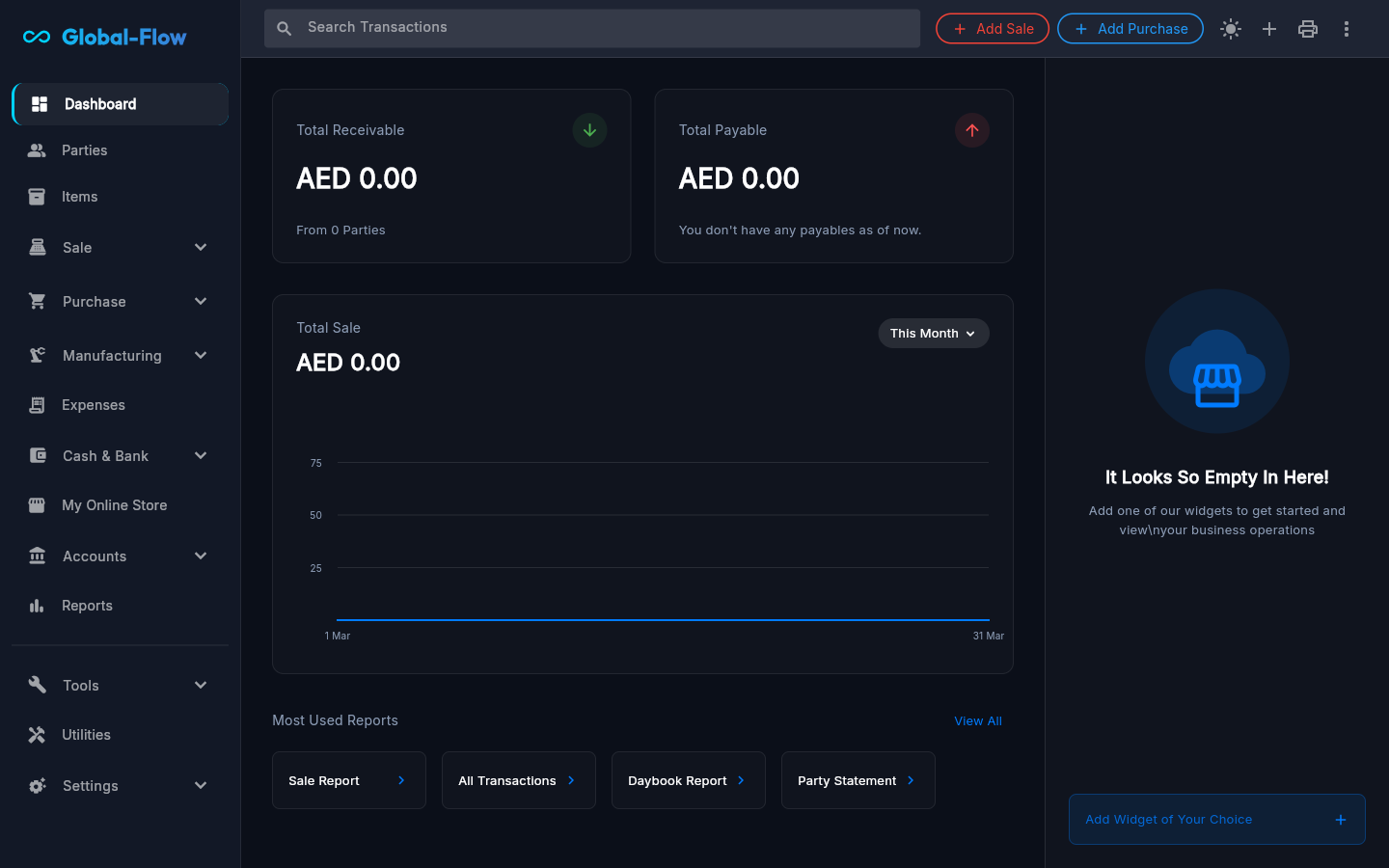
Real screenshot — The live dashboard: total receivable and payable, the total-sale trend chart and the most-used report shortcuts.Dashboard
CRM & Leads
From first enquiry to signed deal
A complete customer relationship layer that sits in front of the invoicing engine. Track leads through a pipeline, manage deals on a Kanban board, run marketing campaigns, equip field sales, send proposals for e-signature and measure conversion.
- CRM Centre
The CRM command centre: pipeline health, activity feed and the day-to-day work queue for the sales team.
- Customers
Dedicated customer records with contacts, addresses, credit terms and full history, linked to every downstream transaction.
- Leads Pipeline
Capture inbound leads and move them through configurable pipeline stages with owners and follow-up dates.
- Deals (Kanban)
Visual Kanban board for open deals — drag a deal between stages, track value and forecast the quarter.
- Marketing CampaignsLicensed Add-on
Plan campaigns, target segments and attribute resulting leads and revenue back to the campaign.
- Field SalesLicensed Add-on
Give representatives an on-the-road view of their territory, visits and orders.
- Proposal e-SignLicensed Add-on
Send quotations and proposals for electronic signature and track acceptance before converting to an order.
- Analytics
Conversion rates, win/loss analysis and rep performance across the pipeline.
- Settings
Configure pipeline stages, lead sources, deal fields and CRM-specific defaults.
Inventory & SCM
Item master and stock integrity
The item master that every sales, purchase, manufacturing and warehouse document depends on. Supports units, pricing tiers, tax slabs, barcodes, stock levels and multi-warehouse quantities.
- ItemsRole-based
Full item master with sale and purchase pricing, taxes, units of measure, barcodes, opening stock, reorder levels and per-warehouse quantities.
Sales
Quote, sell, deliver, collect
The end-to-end order-to-cash cycle. Start at a quotation or estimate, move through proforma and sale order, issue the delivery note and packing list, invoice, take payment and handle returns — with a POS mode for counter sales.
- Sale Invoices
Create, print and track sale invoices with multi-line items, discounts, per-line tax, transport details and PINT-AE compliant e-invoice output.
- Estimate / Quotation
Send priced quotations and convert an accepted estimate into a sale order or invoice in one action.
- Proforma Invoice
Issue proforma invoices for advance payment or customs and convert to a tax invoice later.
- Payment-In
Record customer receipts against one or many invoices, allocate them to the right receivable and update party balances.
- Sale Order
Capture confirmed customer orders and track fulfilment from order through delivery and invoicing.
- Delivery Note
Dispatch goods with a delivery note, then bulk-convert delivered notes into sale invoices when the invoice is raised.
- Sale Return / Credit NoteUAE Compliance
Process customer returns and issue credit notes — including the 381 credit-note reference required for UAE e-invoicing.
- POSLicensed Add-on
Point-of-sale mode for counter and retail selling, with its own settings for receipt numbering, payment modes and thermal printing.
- Packing List
Generate packing lists for shipments with item, quantity and package breakdowns for the logistics team.
Purchases & Procurement
Source, receive, reconcile
The complete procure-to-pay cycle including a structured RFQ process and an inbound e-invoice inbox that captures supplier invoices arriving through the compliance network, then flows into the goods receipt and payment steps.
- Procurement RFQRole-based
Raise requests for quotation, collect supplier bids and compare them side by side before committing to an order.
- E-Invoice InboxUAE Compliance
Receive, validate and accept supplier e-invoices arriving through the compliance network, then push them into purchases without re-keying.
- Purchase
Record supplier bills with per-line tax and discount, and post straight into accounts payable.
- Payment-Out
Pay suppliers against one or many bills, with allocation, bank selection and full audit trail.
- Purchase Order
Raise and issue purchase orders to suppliers and track ordered versus received quantities.
- Goods Receipt Note (GRN)
Book received goods into stock against a purchase order, capturing accepted and rejected quantities on arrival.
- Purchase Return
Return goods to a supplier and issue the corresponding debit note, adjusting stock and payables together.
Manufacturing
Bills of materials to finished goods
Light manufacturing and assembly. Define what a finished product consumes, release work orders, requisition the raw material and let the system move component stock into finished stock.
- Bill of Materials
Define multi-level bills of materials with component items, quantities, wastage allowances and routing.
- Work Orders / Manufacturing
Release production orders against a BOM, track work-in-progress and consume components into finished goods.
- Material Requisitions
Request and issue raw material from stores to the production floor with approval before release.
Projects
Track delivery and margin per job
Run client work and internal projects with a dedicated dashboard that tracks deliverables, costs and profitability against each project.
- Project Dashboard
Live project health dashboard tracking progress, billed and unbilled amounts, cost to date and margin per project.
Expenses
Every cost captured and categorised
Log day-to-day business expenses against the right expense account and bank or cash source, so the profit and loss statement stays accurate without manual journal entries.
- Expenses
Record business expenses with category, payment account, tax treatment and attachment support; expenses post straight to the ledger.
Cash, Bank & Fixed Assets
Treasury with real asset tracking
Manage every place money physically sits — bank accounts, petty cash, cheques, loans — plus the full fixed-asset register with acquisition, depreciation, disposal and asset sales.
- Bank Accounts
Multiple bank accounts with opening balances, currency and transaction history, reconcilable against statements.
- Cash In Hand
Petty-cash registers per branch or till with receipts and payments tracked separately from bank money.
- Cheques
Track post-dated and current cheques received and issued, with status and clearing dates.
- Loan Accounts
Record loans and their drawdown and repayment schedule and keep amortisation visible.
- Fixed Assets
Full fixed-asset register with categories, depreciation schedules, net book value and disposal handling.
- Purchase FA
Capitalise asset acquisitions directly, posting the correct asset and payable entries.
- Sale FA
Dispose of or sell a fixed asset and automatically post the gain or loss against its book value.
My Online Store
Sell outside the office
Publish your catalogue to a hosted online storefront that shares the same item master and stock ledger as the ERP, so online orders never desynchronise from warehouse stock.
- My Online Store
Manage the online storefront: catalogue visibility, published items, pricing and the flow of web orders into sales invoices.
Accounts & Book-keeping
A real double-entry ledger underneath
Because every document posts to the general ledger, the books balance automatically. Drill from any chart-of-accounts node into the ledger statement, post manual journals where needed and reconcile against bank statements and post-dated cheques.
- Chart of Accounts
Fully editable chart of accounts with groups, sub-groups and account-level balances, as the backbone of the double-entry ledger.
- Journal Entries
Post manual double-entry journals with multi-line debits and credits and a hard balance check before saving.
- Ledger Statement
Drill into any account and see every debit and credit with running balance and document links.
- Reconciliations & PDC
Reconcile bank and cash accounts against statements and manage post-dated cheque clearing end to end.
Warehouse & WMS
The floor, not just the ledger
A dedicated warehouse-execution layer built on top of stock: pick digitally, control who enters and leaves the gate, run internal operations with scans, and keep a compliant labour record.
- WMS Dashboard
Warehouse control tower: dock status, open picks, pending receipts, occupancy and today's workload.
- Digital Picking
Guided pick lists with bin locations and scan-to-confirm, so the right item leaves in the right quantity.
- Gate Logistics
Inbound and outbound gate control — record vehicle, driver, and every material movement crossing the gate.
- Internal Ops
Internal stock movements, transfers and put-away between locations with full traceability.
- Compliance & Labor
Warehouse compliance and labour tracking so shifts, activities and statutory records stay audit-ready.
Reports Hub
43+ reports across finance and operations
A single hub for every analytical output in the system: transaction reports, item and stock reports, and party reports, each with date filters and export.
- Transaction Reports
Ten transaction reports covering sales, purchases, payments, receipts and returns across any period.
- Item & Stock Reports
Thirteen item and stock reports: stock summary, movement, valuation, low stock, profitability by item and more.
- Party Reports
Six party reports covering receivables, payables, balances and statements per customer or supplier.
- Export & Drill-down
Every report exports to spreadsheet and prints on the same branded templates as the transaction documents.
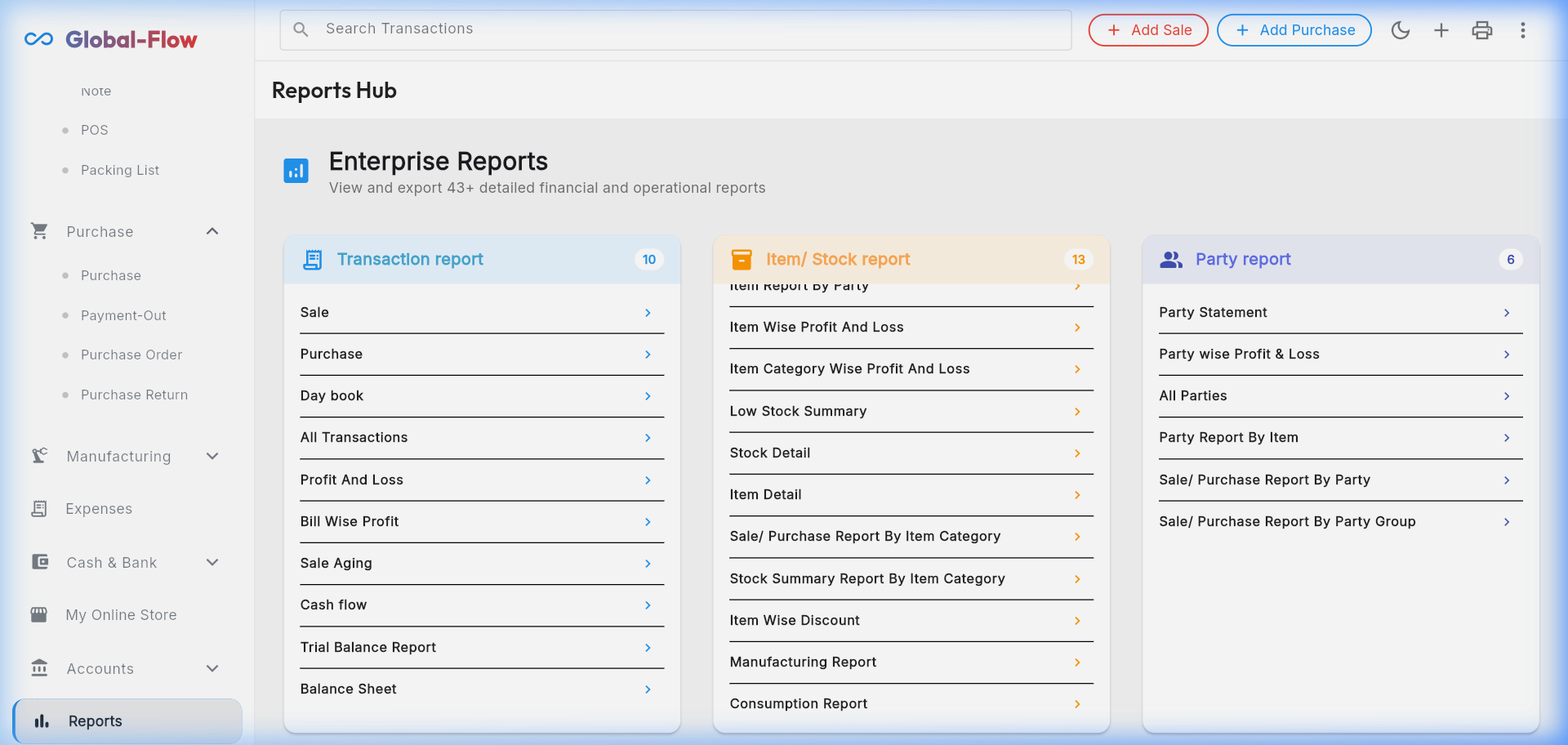
Real screenshot — The Reports Hub: 43+ detailed financial and operational reports grouped into transaction, item/stock and party report families.Reports -> Reports Hub
ASP Compliance (UAE PINT-AE)
Ready for the 2026 e-invoicing mandate
The UAE Ministry of Finance PINT-AE engine. Invoices are converted to UBL 2.1, validated against the mandated field set, hashed for tamper detection and submitted to your certified ASP. This is the module that keeps the business legally invoicing in the UAE.
- ASP Compliance HubUAE Compliance
Monitor every document's compliance status, inspect the generated UBL payload and resubmit failures to the ASP.
- UBL 2.1 Payload EngineUAE Compliance
Native conversion of sale invoices, credit notes and debit notes into structurally valid PINT-AE UBL 2.1 XML.
- 51-Field ValidationUAE Compliance
Live pre-submission audit of the mandated field set — TIN, emirate codes, VAT categories, UN/ECE units and margin schemes.
- Cryptographic Record LockingUAE Compliance
SHA-256 digest chaining with previous-document hash linking, so issued records cannot be altered after submission.
Document Management (DMS)
Every file in one searchable place
A cloud document store attached to the business entities themselves, so the contract behind an invoice or the ID behind an employee is always one click away from the record it belongs to.
- DMS
Upload, organise and retrieve business documents linked to parties, transactions and employees, with cloud storage sync.
HR & Payroll
Including UAE WPS payroll
Manage the employee lifecycle and run payroll. The standout capability is WPS auto-payroll, which produces the UAE Wage Protection System salary file directly from the attendance, leave and overtime records held in the system.
- HR Dashboard
Workforce overview: headcount, leave liability, upcoming payroll and outstanding document requests.
- Employees Directory
Employee master records with contracts, designation, department, salary structure and documents.
- Leave Exceptions
Track leave balances and exception cases so entitlement and absence stay controlled.
- Overtime Log
Record overtime per employee and period, and feed approved overtime into payroll.
- WPS Auto-PayrollUAE Compliance
Generate UAE Wage Protection System salary files and payroll runs straight from the employee and attendance data.
- Document Requests
Raise and fulfil employee document requests such as salary certificates and NOCs, with status tracking.
- Employee PortalRole-based
A self-service portal so staff can view their own records, requests and documents without an admin.
Tools & Governance
Approvals, SLAs and messaging
The control layer over day-to-day operations. Route documents for approval with delegation and SLA tracking, keep a full communication log, and drive transactional email from configurable templates and credentials.
- Approvals Inbox
One inbox for every document awaiting your approval, with the context needed to approve or reject in place.
- Approval SLA Dashboard
See which approvals are breaching their SLA, and who they are waiting on, before they become a bottleneck.
- Approval Delegation
Delegate approval authority to a colleague for a defined period so work keeps moving through absence.
- Communication Logs
A complete audit log of outbound and inbound transactional communications per party and document.
- Email Templates
Edit the templates used for invoices, statements, reminders and approvals without touching code.
- Transaction Msg Credentials
Configure the mail/SMS credentials used to deliver transactional messages from your own address.
- Recycle Bin
Deleted records are retained and restorable, so an accidental delete never costs accounting integrity.
Settings & Administration
Configure the ERP to your business
Deep configuration for every module, plus tenant administration: users and roles, module and feature licensing, workflows, numbering, branding of printed documents, taxes, currencies and developer access.
- General
Company identity, logo, financial year, address, contact details and global application preferences.
- User & RolesAdmin only
Create users and assign roles — tenant owner, purchaser, warehouse, HR manager — which gate the ERP's navigation and actions.
- WorkflowsAdmin only
Configure multi-step approval workflows and the conditions that trigger them per document type.
- Modules & Feature LicensingAdmin only
Turn individual modules and add-ons on or off per tenant, so small teams are not overwhelmed by features they do not use.
- Transaction Settings
Document numbering, default terms, rounding and enable/disable controls for estimates, orders, delivery notes, proforma and journals.
- Print Settings
Choose regular or thermal printer layouts, customise the item table, and set terms and conditions per document.
- Taxes
Configure VAT/GST slabs, tax categories and the rate applied per item and document line.
- Party Settings
Defaults for customers and suppliers: payment terms, credit limits and required fields.
- Item Settings
Default unit, pricing behaviour, stock tracking and item-level defaults applied to every new item.
- Accounting Settings
Control the book-keeping layer: accounting module toggle, journal-entry permission and ledger behaviour.
- CurrencyUAE Compliance
Multi-currency configuration with exchange rates, used for the dual-currency tax accounting required by PINT-AE.
- POS Settings
Point-of-sale configuration: till behaviour, receipt format, payment modes and cashier defaults.
- Mail Server ConfigurationAdmin only
Connect your own SMTP/SMS provider so transactional mail leaves from your domain.
- ASP GatewayAdmin only
Credentials and endpoint configuration for the compliance gateway that submits invoices to the FTA network.
- Developer APIsAdmin only
Manage API keys and integration access for connecting external systems to the ERP.
- Tutorials & Knowledge Base
Built-in guidance and how-to material, reachable from the sidebar without leaving the app.